Elements joined by a visible line, path or other connecting treatment are likely to be perceived as related. This can make a dependency, sequence or route clearer than leaving people to infer the connection from position alone.
Use a connector when the relationship itself matters to the task. Give it a clear start and end, and add direction or a label when the meaning would otherwise be ambiguous. Separate visual connection from actual behaviour: a line may mean sequence, data transfer, dependency or simply annotation. Keep the same convention throughout the screen. As a diagram grows, reduce crossings and make selections readable, because a dense web of accurate lines can still be hard to trace.
02 / RECOGNISE
See it in real products.
Examples of how the principle can appear in an interface.
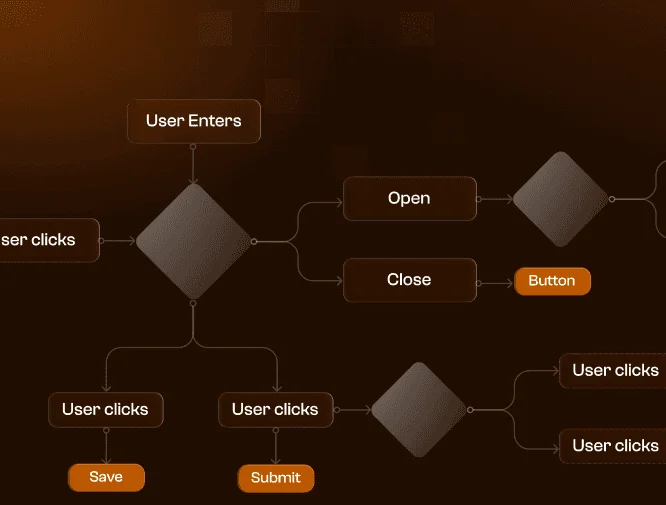
Connect the steps rather than relying on their position
FigJam connectors attach shapes and notes to one another, and can include arrowheads and labels. The visible paths show which step leads to which, even when the boxes are not close together. The example illustrates why a diagram should communicate relationships explicitly instead of requiring readers to guess them from left-to-right placement.
Keep the chosen route visibly connected from start to destination
Apple Maps uses a continuous route line to connect locations along a journey. Road details can be spread across the screen, but the line gives the selected journey a visible relationship between its parts. Check whether alternative routes and traffic colours remain distinguishable so the line does not imply a different route or guarantee a condition that may change.
Explicit relationships can support tracing a sequence or dependency. Test whether people can follow the correct path and explain what each connection means.
Possible influences to investigate, rather than guaranteed outcomes for every product.
04 / APPLY
Put it into practice.
01
Use connectors for relationships people need to follow
02
Make direction and relationship type explicit
03
Keep crossings and competing paths understandable
05 / EXPLORE WITH UPSLIDE
Apply it with Upslide.
Use a practical guide, read a deeper explanation, or examine a related Upslide project.